


.svg)

.svg)

.svg)


What Is Field Service Automation?
Defining field service automation
Field service automation is the use of software, AI, and mobile technology to handle field service tasks that would otherwise be done manually, including scheduling, dispatch, work order tracking, parts management, and customer updates. Instead of relying on manual, paper-based processes, automation digitizes workflows, eliminates repetitive tasks, and can even make intelligent decisions about scheduling, dispatching, and resource allocation using AI, machine learning and AI agents.
Want to see field service automation in action?


FIELD SERVICE AUTOMATION AT A GLANCE
Key takeaways
- Field service automation replaces manual scheduling, dispatch, paperwork, and customer follow-up with software-driven workflows.
- Core components include scheduling and dispatch, work order management, parts and inventory, digital forms, and automated customer communication.
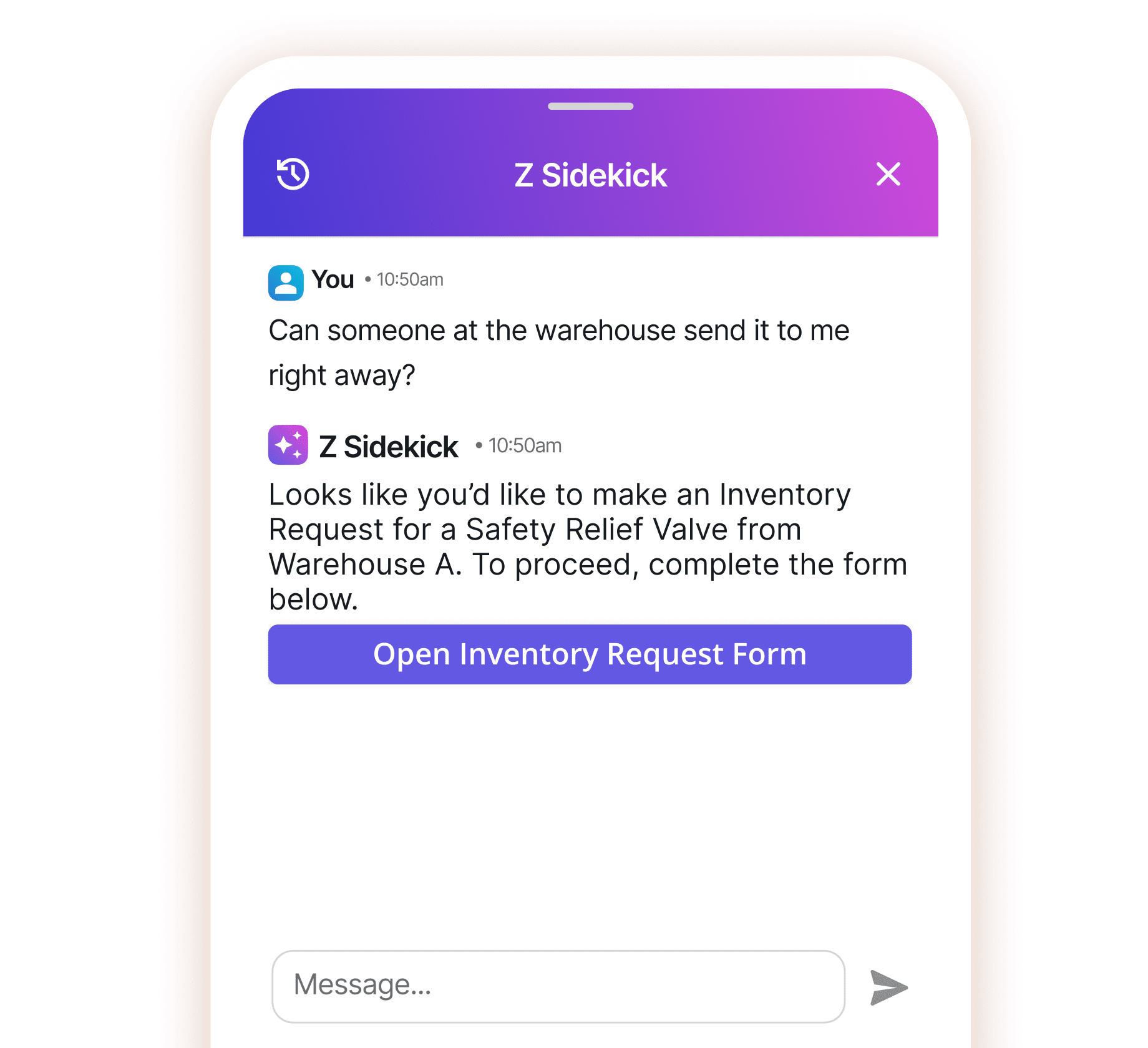
- AI agents are the newest layer of automation. They answer technician questions, surface operational data, and trigger workflows on their own.
- Automation is a capability of field service management (FSM) software, not a separate product. FSM is the system of record; automation removes the manual steps inside it.
- The results are measurable: top-performing service teams fix 88% of jobs on the first visit, against 60% for the bottom quartile.
AUTOMATION VS. FSM SOFTWARE
Field Service Automation vs. Field Service Management Software
The two terms often get used interchangeably, but they describe different things. Field service management (FSM) software is the system of record: it holds your work orders, schedules, assets, parts, and customer data. Field service automation is what that system does without human input. It assigns the right technician automatically, sends the appointment reminder, flags the low stock, and generates the closeout report.
Most modern FSM platforms include some automation. The difference is how far it goes. A basic tool digitizes forms and calendars. A platform like Zinier's Studio Z lets you build and automate workflows for your specific processes without writing code.
WHY IT MATTERS
Benefits of Field Service Automation
Companies adopt field service automation because the manual alternative is expensive. Dispatchers spend hours juggling schedules, technicians drive routes that don't make sense, and paperwork sits in a truck until Friday. Automation targets those specific failure points:
- More jobs per technician. Automated scheduling and dispatch matches jobs to skills and location, cutting travel time and idle gaps between appointments.
- Higher first-time fix rates. Technicians arrive with the job history, site details, and parts they need to finish the work in one visit.
- Lower back-office cost. Fewer status calls, less manual data entry, and no retyping paper forms into the system.
- Faster billing. Digital closeout packages are generated when the job completes, so invoices go out in hours instead of weeks.
- Better customer experience. Customers get automatic confirmations, arrival windows, and status updates without calling in.
THE NUMBERS BEHIND AUTOMATION
Field Service Automation ROI: What the Data Shows
The gap between automated and manual field service operations is well documented. Aquant's 2026 Field Service Benchmark, built on nearly 30 million service events across 161 organizations, puts numbers on it:
- Top-performing service organizations achieve an 88% first-time fix rate. Bottom performers sit at 60%, with the industry median at 77%.
- Top performers resolve cases in 2.5 days on average. Bottom performers take 10 days.
- Failed visits consume 25% of total service cost at the median, and 44% for bottom performers, compared with 14% for the best-run teams.
- Closing those gaps is worth double-digit service cost reductions, up to 26% in some segments.
The productivity ceiling is real too. Salesforce's State of Service research found that 68% of technician time goes to tasks like manually entering case notes and other administrative work, which is exactly the work automation removes. And the shift is accelerating: Gartner predicts agentic AI will autonomously resolve 80% of common customer service issues by 2029, and Grand View Research projects the field service management market will grow from $6.67 billion in 2026 to $13.85 billion by 2033.
HOW AI AGENTS CHANGE THE DEFINITION OF FIELD SERVICE AUTOMATION
How Agentic AI is Transforming Field Service Automation
The latest evolution in field service automation incorporates agentic AI - intelligent systems that can make autonomous decisions and take actions without constant human oversight:



CORE COMPONENTS OF FIELD SERVICE AUTOMATION
Scheduling and Dispatch Optimization
Field service automation systems use algorithms to assign the right technician to the right job based on skill sets, location, availability, and job requirements. This eliminates manual scheduling inefficiencies and reduces travel time between jobs. When a job overruns or a technician calls in sick, the schedule rebuilds itself instead of waiting for a dispatcher to untangle it.



CORE COMPONENTS OF FIELD SERVICE AUTOMATION
Inventory and Parts Management
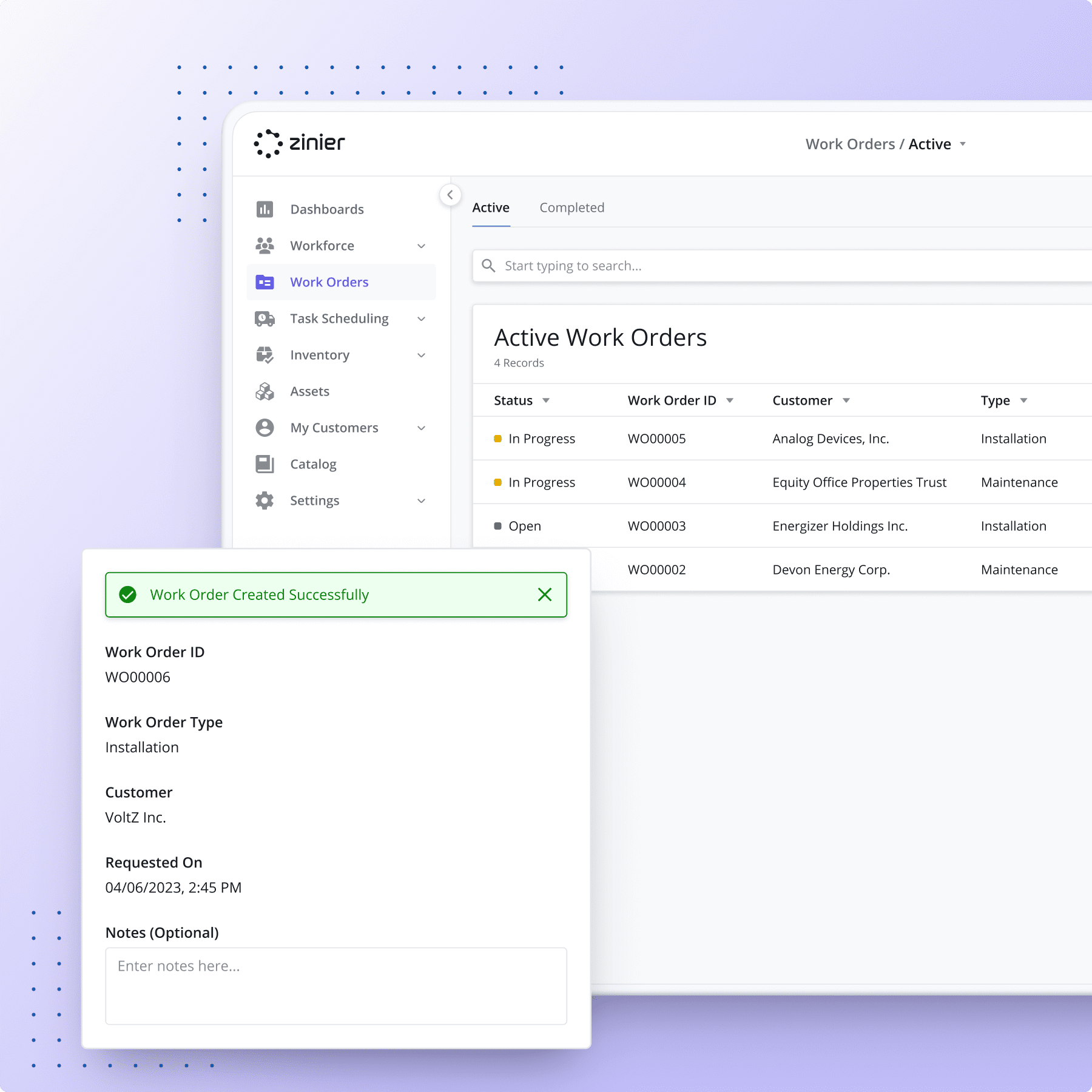
Automation tracks parts from the warehouse to the technician's van, reserves stock against scheduled jobs, and flags shortages before they delay work. Technicians see what they have on hand and what each job requires before they leave, which protects first-time fix rates and cuts repeat visits.
CORE COMPONENTS OF FIELD SERVICE AUTOMATION
Digital Forms for Data Collection and Reporting
Digital forms and automated data collection replace paper-based processes, enabling more accurate information gathering, standardized reporting, and automated closeout package creation. Photos, signatures, and readings are captured on site and sync when connectivity returns, so nothing waits in a truck until Friday.


BUYER'S GUIDE
How to Choose a Field Service Automation Platform
Most field service automation solutions cover the basics: scheduling, work orders, and mobile forms. The differences show up in how far the automation goes and how much of it you can adapt yourself. Six things to evaluate before you buy:
- Scheduling intelligence. Ask whether the system just displays a calendar or actually assigns work based on skills, location, availability, and SLA priority. The first is a digital whiteboard; the second is automation.
- No-code configurability. Your processes will change. If every workflow tweak needs a development project or a vendor change request, automation stalls. Zinier's platform lets operations teams build and modify workflows without writing code.
- Mobile experience with offline support. Technicians work in basements, on rooftops, and in rural coverage gaps. Forms, photos, and signatures need to work offline and sync later.
- Integration depth. The platform has to exchange data with your ERP, CRM, and inventory systems. Check the integration options against your actual stack, not the logo wall.
- AI roadmap. Rule-based automation is table stakes. Ask what the vendor ships today for AI agents: answering technician questions, surfacing operational data, and triggering workflows autonomously.
- Total cost of ownership. Licensing is only part of it. Factor in implementation, integration work, training, and the cost of change requests over a three-year horizon.
AUTOMATION IN PRACTICE
Field Service Automation Examples by Industry
Any business that installs, inspects, or maintains assets in the field can automate. What gets automated first depends on the industry:
- Telecom and fiber. High-volume installs live or die on scheduling density. Automation generates work orders from network rollout plans, sequences fiber-to-the-premises installations, and reschedules automatically when a job overruns.
- Utilities. Inspection and maintenance programs cover thousands of distributed assets. Automation builds recurring inspection schedules, routes crews by territory, and flags anomalies from utility field data before they become outages.
- EV charging networks. Uptime SLAs demand fast dispatch. When a charger reports a fault, automation creates the ticket, checks parts availability, and assigns the nearest qualified technician to the EV charging site.
- Manufacturing. Equipment installed at customer facilities needs preventive maintenance on schedule. Automation generates recurring service visits, reserves the right spare parts, and keeps a complete service history for every manufacturing asset in the field.
GETTING STARTED
How to Implement Field Service Automation
You don't have to automate everything at once. Most successful rollouts follow the same sequence:
- Map your current workflow. Document how a job moves from request to invoice today, and note where it stalls.
- Pick the biggest manual bottleneck first. For most field service teams, that's scheduling and dispatch.
- Choose a platform that fits your processes. Look for no-code configuration so you can adapt workflows without a development project.
- Run one workflow end to end. Measure jobs per day, travel time, and time to invoice before and after.
- Expand and add intelligence. Once the foundation works, layer in AI agents to handle questions and trigger actions automatically. Our guide to how AI agents work in field service covers what that looks like in practice.
COMMON QUESTIONS
Field Service Automation FAQs
What is field service automation in simple terms?
It's software that handles the repetitive parts of field service work, like assigning technicians, sending customer notifications, and filling out reports, so people don't have to do them manually.
What's the difference between field service automation and FSM software?
FSM software is the system where your work orders, schedules, and customer data live. Automation is what that system does on its own, from auto-assigning jobs to generating closeout packages.
Which tasks should you automate first?
Start with scheduling and dispatch. It's usually the most manual process and the one where automation shows measurable results fastest: travel time, jobs per day, and missed appointments.
What ROI can you expect from field service automation?
Benchmarks from Aquant's 2026 study of 30 million service events put the gap between top and bottom performers at 88% vs 60% on first-time fix and 2.5 vs 10 days on resolution time. Companies closing those gaps see double-digit service cost reductions, up to 26% in some segments.
Which industries use field service automation?
Any industry that installs, inspects, or maintains assets in the field. Telecom and fiber providers, utilities, EV charging network operators, and manufacturers are among the heaviest adopters.